Event WiFi · Temporary event connectivity

Event WiFi. Ready for showtime.

Temporary internet and WiFi for your guests, crew, vendors and equipment. Beyond plans site coverage, separates working networks from guest access and connects event information, ordering and feedback for the days you need it.

  • Give guests information, ordering and feedback
  • Connect crew, vendors and event equipment
  • Bring temporary internet and WiFi to your site
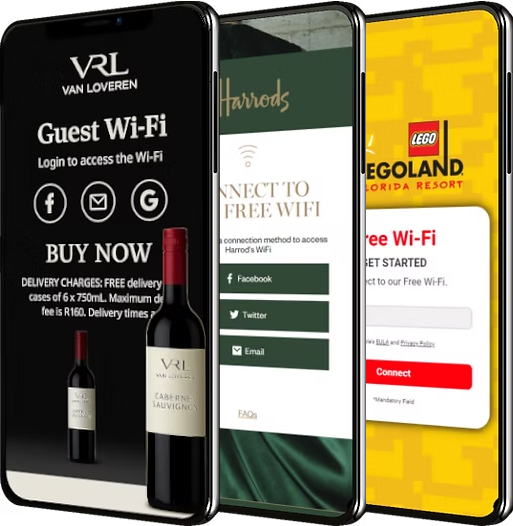
Branded Guest WiFi sign-in examples displayed on phones.View image
Guest sign-in examples · a branded welcome can link guests to event information, ordering and offers.
What changes

A better event for guests, teams and vendors.

Help guests enjoy the event

Put schedules, maps, ticketing links and event-app downloads in the WiFi welcome. Link guests to food ordering, vendor shops and merchandise, and ask for feedback while they are there. Mobile-first pages in over 25 languages help different audiences get started.

Keep teams and trading connected

Give staff, vendors, payment terminals and ticket scanners the connectivity their jobs need. Keep their working networks separate from guest traffic and plan access for connected cameras, sensors and other event equipment.

Get the site ready to connect

Beyond plans the temporary internet link, wireless coverage and installation around your site and event dates. Agree power, backup connectivity and support needs, then test the required services before the gates open.

The capabilities behind the outcome

Connectivity for every part of the event.

The guest welcome is one part of the job. Your crew, entry gates, trading areas and equipment need their own coverage and access plan.

Temporary internet and site coverage

Use a suitable venue connection or arrange temporary connectivity around what is available at the site. Plan indoor and outdoor coverage, cabling, equipment mounting and power, with a backup path where the event needs one. Size the internet link and WiFi for simultaneous demand, not just total ticket sales.

Crew and vendor access

Staff WiFi supports work-account access for your team. Agree temporary access for contractors and vendors, and keep operational traffic separate from public guest access. Define who can connect, what each group can reach and when access ends.

Payments, ticketing and access control

Connect vendor point-of-sale (POS) terminals, card machines, ticket scanners and access-control devices at the places they will be used. Check each supplier’s wired or wireless connection requirements and test payments and entry workflows with the event systems. Connectivity supports those systems; payment processing and ticket validation stay with their providers.

Connected event equipment

Give cameras, sensors, digital signs and other Internet of Things (IoT) equipment a suitable device network. Devices that cannot open a web sign-in page need their own access method. Plan device credentials, coverage, local device communication and isolation around the equipment being used.

Information, ordering and on-site sales

The guest welcome can open schedules, maps, online ordering, vendor and merchandise destinations. Place sponsor and advertising messages in the same journey. Seat-aware offers, order-ahead concessions and timely zone-based promotions use the event’s actual ordering systems and compatible location signals; Engage supports personalised journeys.

Feedback and event-day insight

Surveys on Capture or Engage lets guests rate the experience while it is fresh. Supported zone and dwell reports help teams review queues and movement alongside campaign response and app uptake. Guest data capture supports tens of thousands connecting at once when the network is designed for that load; keep marketing permission separate from WiFi access.

Delivery with Beyond

How Event WiFi works.

  1. Share the event brief

    Tell us the site, dates, guest numbers, crew, vendors, connected devices and existing internet. Include the services that must keep working and the setup access available.

  2. Prepare and test the site

    Beyond agrees the internet link, coverage, separate networks, guest content and support. Install during the agreed setup window and test the required devices and workflows before opening.

  3. Run the event and close down

    Use the agreed monitoring and support during the event. Review feedback and usage, then remove temporary equipment and end temporary access according to the event plan.

Event WiFi is a specialised delivery service, combining temporary connectivity with the access each audience needs. Guest WiFi has Connect, Capture and Engage plans; Staff WiFi supports the crew. Vendor and equipment networks are configured around device requirements. Shield and Paid WiFi are Guest add-ons on all three plans; Surveys requires Capture or Engage.

Before you choose

Questions about Event WiFi.

Can you provide temporary internet as well as WiFi?

Yes. Beyond plans the site’s internet connection and the WiFi network together for your event dates. Share the venue location, any existing connection, installation access and power arrangements so we can agree the available link, capacity and backup options.

Can we keep vendors and crew separate from guests?

Yes. Plan separate controlled networks for guests, staff, vendors and equipment, with access and bandwidth policies appropriate to each job. Staff WiFi can use your organisation’s supported work accounts; temporary teams and device access are configured for the event.

Can card machines, ticket scanners and IoT devices connect?

They can use the agreed wired or WiFi setup that their supplier supports. Tell us the device models, quantities, locations and connection requirements. Equipment that cannot use a browser sign-in page needs a separate access method, and critical payment and entry workflows are tested with their providers.

Can guests order food or buy merchandise through the WiFi welcome?

Yes. Link guests to your event’s ordering, vendor and merchandise destinations, alongside schedules, maps and ticketing information. Beyond can scope supported integrations for a more connected journey. The ordering, ticketing and payment systems remain the systems of record.

Can we collect feedback and offer sponsor placements?

Yes. Add Surveys to Capture or Engage for event feedback, and use guest sign-in and destination content for sponsor or advertising placements. Agree the questions, content and commercial placements during setup.

Can we offer paid WiFi upgrades?

Paid WiFi on Connect, Capture or Engage supports paid time, data or speed packages alongside general guest access. Agree the options around the event’s internet and WiFi capacity; a paid package does not create extra network capacity.

What about busy periods, backup connectivity and on-site support?

Plan around the highest simultaneous demand at gates, trading areas and guest zones. Share payment, ticketing, production and live-streaming requirements, plus the backup and support you need. Beyond agrees capacity, available backup links, monitoring and support coverage in the event delivery scope.

Can we also use attendee data after the event?

Capture builds attendee records with separate marketing permission; Engage adds personalised follow-up for relevant future events or offers, and can encourage guests to use the event app again. Use this optional follow-up when it suits your event. Verify validates contact details; age and ticket checks stay with their respective processes.

Your next step

Get your event connected.

Share your event dates, site, guest numbers and the teams and devices that need access. Beyond will use your event brief to plan connectivity, guest services and delivery.