


Illustrative contemporary venue with guests, café seating and a city view.
STAFF WIFI & IDENTITY-BASED ACCESS

Staff WiFi. Without Shared Passwords.

Connect employees through the work accounts they already use, with individual WiFi access instead of one shared password. Beyond brings your staff identities, devices and network together so people can connect easily and IT can control who gets in.

  • Work Identity Sign-In
  • Automatic Device Reconnection
  • Directory-Synced Access
  • Central Access Insights
Price Your Venue · Coming soonSee how it works
Powered by Purple. Delivered by Beyond.

Enterprise WiFi. Individual access.

Countries using identity-based technology
90+
Cloud RADIUS uptime SLA
99.9%
Credentials for people and devices
Individual
  • Cisco Meraki
  • HPE Aruba
  • Ruckus
Staff WiFi capabilities

The right WiFi access for the way your team works.

Give every employee their own way onto WiFi, keep access aligned with their work account and see what is happening across your sites. Beyond connects the systems you already use to make staff access easier to manage.

Identity & lifecycle

One work identity. Individual WiFi access.

Staff WiFi links each employee’s network access to their existing work account. Microsoft Entra ID, Okta and Google Workspace confirm who is connecting; supported identity providers can use SAML single sign-on.

SCIM directory synchronisation keeps accounts and groups aligned as people join, change roles or leave. Disable an account and subsequent WiFi authentication is refused, without changing everyone else’s credentials.

  • Work accounts replace a company-wide WiFi password.
  • Directory groups determine the appropriate access policy.
  • Joiner, mover and leaver changes follow your configured directory sync.
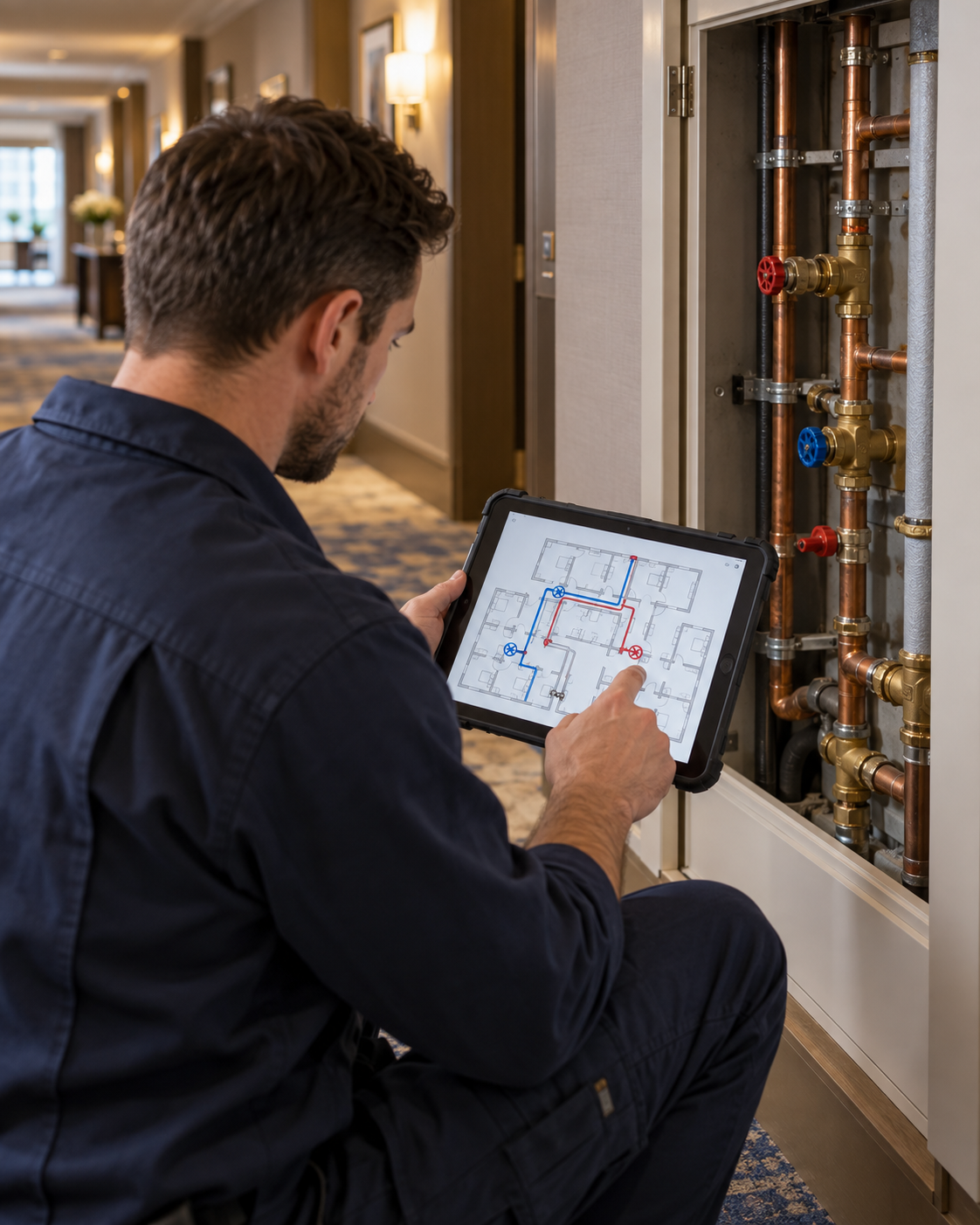
Illustration of a maintenance employee using a work tablet in a hotel
Staff WiFi Portal

Know who connected. Understand what happened.

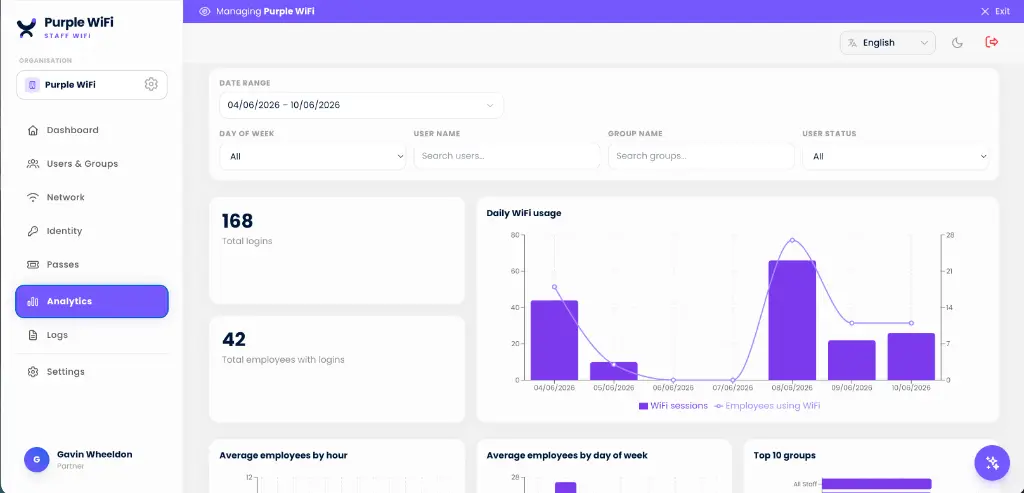
A live user directory and session records put people, devices, groups and sites in one place. Find accepted or rejected connections, timestamps, the applied network policy and rejection reasons when someone needs help.

Compare usage and occupancy across sites to inform capacity and workplace planning. Ask AI questions about your own session data in plain English, then use the underlying records to investigate the answer.

  • Review authentication evidence for support and access audits.
  • Send events to Microsoft Sentinel, Splunk, Elastic or Datadog for wider security monitoring.
  • Configure retention around your account and connected systems.
Staff WiFi Portal analytics with date, user, group and status filters and example usage charts
Actual Staff WiFi Portal · example usage report. Figures shown are not Beyond outcomes.
Encrypted authentication

Secure access. Existing WiFi.

Staff WiFi adds identity-based access to your existing enterprise WiFi. Cloud RADIUS is the online service that checks whether an employee or device is allowed to connect, without an on-site authentication server. Beyond integrates it with your directory and access points.

802.1X checks access before a device joins. With EAP-TLS, a unique digital certificate proves authorisation without a shared password; WPA2 or WPA3-Enterprise encrypts the connection.

Groups & multiple sites

The right network for each team.

Use directory groups to place staff and contractors on the agreed network segment, or VLAN. Keep work access separate from visitors, and apply the policy each role needs.

Manage agreed rules centrally across offices, branches or campuses. Enrolled, supported devices reconnect at enabled sites without every building needing its own RADIUS server.

Device compliance

Let your device policy govern access.

With Microsoft Entra Conditional Access configured, devices that fail your compliance rules can be refused at authentication. JumpCloud can also supply device posture checks, helping WiFi access follow your device policy.

Beyond checks your identity provider, device management, operating systems and WiFi together, then configures the supported combination. Network access control complements your application permissions and wider security tools.

How it works

Enrol once. Get on with your working day.

Here is the employee journey with a certificate-based WiFi pass. Managed company devices can receive the setup automatically; personal devices can use self-service enrolment.

Sign in and enrolUse a verified work identity

On a personal device, the employee signs in through the agreed self-service flow or Purple app. Their work account confirms who they are. A managed company device can instead receive its certificate and WiFi profile automatically through your device-management system.

  • Beyond prepares a branded WiFi pass template for consistent enrolment.
  • The configured directory group supplies the appropriate access policy.

Keep access up to dateFollow account and role changes

Configured SCIM synchronisation updates access as directory membership changes. When an account is disabled, its access is revoked and later authentication attempts are refused. An individual credential or key can also be revoked when a device is lost.

  • Change one person’s access without rotating a company-wide password.
  • Keep an access trail for support and audits. Re-authentication behaviour is agreed for your network.
Connection methods

A practical way in for every kind of device.

Company laptops, personal phones and printers need different ways to prove they belong on the network. Beyond selects the supported combination for your equipment and designs a branded WiFi pass template for consistent enrolment.

Illustration of a maintenance employee using a work tablet in a hotel
Connection methods

Managed certificates

Central setup for company devices

For managed laptops, phones and tablets when IT needs consistent configuration without asking employees to set up WiFi themselves.

  • Your MDM or UEM system delivers a unique certificate and WiFi profile automatically. 802.1X with EAP-TLS checks that certificate when the device connects.
  • Microsoft Intune, Jamf Pro and JumpCloud support the managed-device rollout. Supported enrolment options also include Iru and Addigy.
  • Certificate delivery follows your device-management policy, helping IT enrol staff devices consistently and remove repeated manual WiFi setup.
  • Review the device-management and operating-system details in the capabilities section.
Price Your Venue · Coming soonHow enrolment works
Illustrative workplace venue with café seating and people using devices
Connection methods

Self-service & Passpoint

A simple route for personal devices

For employees bringing their own phones or tablets, with individual access control and less manual configuration by IT.

  • Staff sign in using their work identity through self-service enrolment or the Purple app. Each supported device receives its own connection settings and credential.
  • Passpoint is the profile that lets a supported device recognise and reconnect to enabled WiFi automatically. The app provides an enrolment route; it is not a separate shared-password network.
  • Use a branded WiFi pass template to give staff a consistent enrolment experience. Directory groups still determine their agreed network access.
  • For supported older equipment, PEAP is an 802.1X alternative that checks an individual username and password. Beyond selects it only where appropriate.
Price Your Venue · Coming soonFollow the employee journey
Illustration of a maintenance employee using a work tablet in a hotel
Connection methods

Personal WiFi keys

Individual access without a work sign-in

For contractors, staff who prefer a key, and printers, tills or other headless devices that cannot use certificate enrolment.

  • Extended pre-shared keys (xPSK) give each person or device a separate WiFi key. Some equipment calls these individual keys iPSK.
  • Apply the appropriate group network policy, then rotate or revoke one key without changing everybody else’s, where your WiFi equipment supports it.
  • This is a practical alternative for supported BYOD and equipment that cannot complete a browser or app sign-in. It does not provide the same certificate enrolment flow.
  • Beyond checks your access-point support, firmware and configuration before choosing the combination for your staff and devices.
Price Your Venue · Coming soonCheck compatibility questions
Optional Staff WiFi add-on

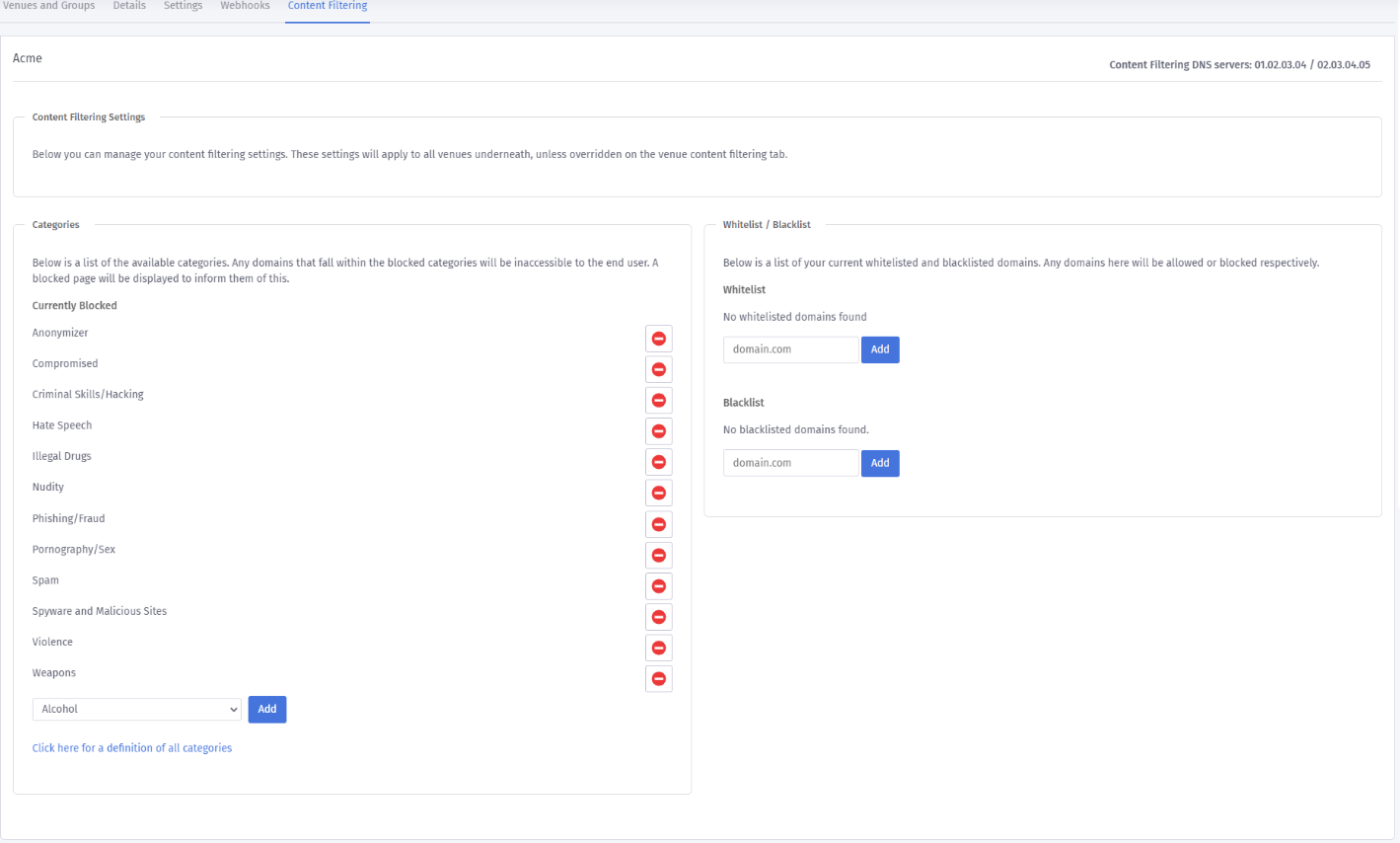
Add safer browsing and fewer distractions.

Actual Shield filtering settings with example categories and domain rules
Actual Shield settings · example configuration; final policies follow your requirements.

Shield

Shield is an optional Staff WiFi add-on that filters web requests at the DNS layer. Block unwanted ads, trackers and distracting content, reduce unnecessary traffic and help protect staff from known malicious websites.

  • Choose website categories to block, including unwanted streaming services.
  • Allow or block specific domains and agree exceptions for work tools.
  • Set policies by venue and schedule, with Safe Search and a branded blocking page.
  • Review filtering activity and blocked URLs in the Portal.
Published potential & operational benefits

Less friction. Better visibility. Clearer control.

Passwordless WiFi potential

Up to 80%

Fewer password-related helpdesk tickets

Purple reports this potential reduction when passwordless WiFi onboarding stops failing. It applies to password-related tickets, not all IT support. Your outcome depends on your setup.

Useful authentication evidence

Who. When. Why.

Person, device, policy and connection records

Use accepted and rejected events, timestamps and rejection reasons to troubleshoot access and support reviews. Send events to your SIEM to investigate them alongside wider security activity.

An informed view of your sites

One Portal

Directory, usage and occupancy insights

Compare site activity to inform capacity and workplace planning. Ask AI questions about your session data and review the underlying evidence.

Beyond brings it together

Beyond brings the right pieces together.

Staff WiFi should fit how your organisation works. Beyond plans the solution around your people, existing systems and business goals, then handles the configuration, integration and agreed support.

Plan the right access

Beyond reviews your sites, identity provider, staff groups, device mix and existing WiFi. You get a supported approach and defined rollout scope.

Integrate and test

We connect the directory, configure network policies and prepare device-management and enrolment integrations. The agreed setup is tested before staff move across.

Run it confidently

We train administrators, document the setup and scope ongoing platform management and support around your organisation.

Employees & contractors

A familiar work sign-in

Staff enrol through their work identity rather than finding a shared WiFi password. Managed devices can receive the configuration automatically.

Keep moving between sites

Supported devices reconnect at enabled offices, branches or campuses after enrolment. Contractors and headless equipment can use an appropriate personal key.

Practical onboarding help

Beyond prepares the branded pass template and helps staff enrol. The connection method follows your device mix and agreed access requirements.

Operations & workplace teams

Plan around real usage

Portal usage and occupancy patterns inform discussions about capacity, activity and workplace requirements across sites.

Set sensible browsing rules

Optional Shield reduces unwanted browsing and unnecessary traffic with agreed categories, domain exceptions, schedules and threat filtering.

One coordinated rollout

Beyond brings the systems and people together, with configuration, administrator training and support scoped to your business needs.

Clear answers

Common Staff WiFi questions.

How is Staff WiFi different from Guest WiFi?

Staff WiFi connects employees through verified work identities and individual credentials, with access governed by your staff policies. Guest WiFi welcomes visitors and can support consent-led marketing; the two serve different purposes and can be kept on separate network segments.

Can we keep our existing WiFi equipment?

Beyond integrates with your venue’s existing WiFi hardware and checks support, firmware and configuration during discovery. Enterprise equipment such as Cisco Meraki, HPE Aruba and Ruckus can authenticate through cloud RADIUS; we confirm the requirements for your estate before rollout.

What if we use another directory or device-management tool?

SAML single sign-on connects supported work identity providers; SCIM synchronises accounts and groups. Alongside Intune, Jamf Pro and JumpCloud, supported enrolment options include Iru and Addigy, while Hexnode, Workspace ONE and other UEM tools can deliver the required SCEP or PKCS certificate payloads. Beyond checks the provider, device and configuration combination during discovery.

Can older devices still use a work username and password?

Yes, supported legacy setups can use PEAP, an 802.1X method that checks an individual username and password. Certificates are the preferred approach for managed devices, while personal keys can suit devices that cannot use a work sign-in. Beyond selects the suitable method rather than forcing every device through the same flow.

What happens when an employee leaves or a device is lost?

Configured directory synchronisation revokes a leaver’s access, and later authentication attempts are refused. An individual credential or personal key can also be revoked without rotating a company-wide password. Beyond confirms re-authentication behaviour for your setup; revocation is not a promise that every active session ends instantly.

Does Staff WiFi replace our security systems or application permissions?

No. It controls access to the WiFi network and supplies useful authentication evidence; your applications still manage their own permissions. Your SIEM remains the place to correlate wider security events, and log retention is configured for your account and connected systems.

Do we need our own authentication server?

No on-premise RADIUS server is required. Purple operates the cloud authentication service with multi-region failover; Beyond integrates and configures it for your network. Internet connectivity and your WiFi equipment remain separate parts of the overall service.

What does Shield add to Staff WiFi?

Shield adds DNS-based category and domain filtering, threat protection and ad and tracker blocking. It helps limit unwanted browsing and traffic using agreed policies; it does not reserve bandwidth for applications or replace your firewall. Beyond configures the rules and exceptions around the work your team needs to do.

How do I price Staff WiFi?

Staff WiFi pricing is handled through our price calculator. Beyond helps you choose the connection methods, integrations and support your organisation needs.

Plan your Staff WiFi

Make staff access easier to run.

Give your people a simpler way to connect and your IT team clearer control over who gets in. Beyond brings your directory, devices and existing WiFi together, from the first access policy to onboarding and ongoing support.

Choose the connection methods that suit your team, then plan the rollout around your sites and devices.

Price Your Venue · Coming soonExplore connection methods